Worktrees & env files
Where Plexus puts each session's git worktree, how .env and other gitignored files are copied in, and the block of dev server ports every session gets.
Every session that isn't on the root tree runs in its own git worktree. Plexus copies the gitignored env files it needs, like .env, in as the worktree is created, and gives it its own block of dev server ports.
Where worktrees live
When you start a session, Plexus cuts a git worktree for it — on a new branch off the base you picked, or on the existing branch you chose. By default it lands at:
<project>/worktrees/<session-name>
The subfolder comes from Where to create session folders (Settings → Worktrees & hooks, default worktrees); the session name is slugified and appended automatically. The value is always a relative path under the project root — it can never escape it, and a path that would is refused when you save the setting rather than quietly adjusted when the session is created. Separate folders with a forward slash (.plexus/wt), which works on every platform. The layout, the env-file copying below, and the create, run, and teardown hooks are the same whichever way the session got its branch. Root-tree sessions don't get a worktree; they run directly in the project's root working tree. See Sessions for the full lifecycle.
Auto-gitignore
When a worktree is created inside the repo, Plexus adds its parent folder to the repo's .gitignore so worktree contents never surface as untracked changes. This is Hide session folders from git (Settings → Worktrees & hooks, default on). Leave it on unless you're managing the ignore entry yourself.
Cleaning up worktrees
Removing a session tears its worktree down: the folder goes, and so does git's own record of it. Archiving keeps both, so the session stays resumable. Removing a whole project or workspace offers the same choice — a Tear down worktrees switch in the confirmation, off by default, so nothing with uncommitted work in it disappears unless you say so.
Leftovers can still happen: you delete a worktree folder yourself, a drive goes away mid-teardown, or you chose to keep the worktrees when removing a project. Those are cleaned up from the Git tab's Worktrees section — see When a branch is locked to a worktree, which also covers why a leftover keeps git from letting you delete or check out that branch. Tearing a worktree down never takes a branch Plexus didn't create with it — see Archive vs. remove.
Why env files need copying
A fresh worktree is a clean checkout — it holds only tracked files. Anything gitignored, most importantly .env and .env.local, is not carried over. A dev server or test runner that reads those files would break the moment the agent runs it inside the worktree.
So as each worktree is created, Plexus copies the paths you configure into it — regardless of .gitignore.
Copying paths into worktrees
Two settings control the copy:
| Setting | Default | What it does |
|---|---|---|
| Copy files into new session folders | On | Whether to copy any paths into a new worktree |
| Files and folders to copy | .env, .env.local | The files and folders to copy |
Out of the box, .env and .env.local land in every new session worktree.
Adding paths
- Open Settings and go to the Worktrees & hooks page.
- Make sure Copy files into new session folders is on.
- Add each file or folder you want copied to the paths list, using the add/remove controls.
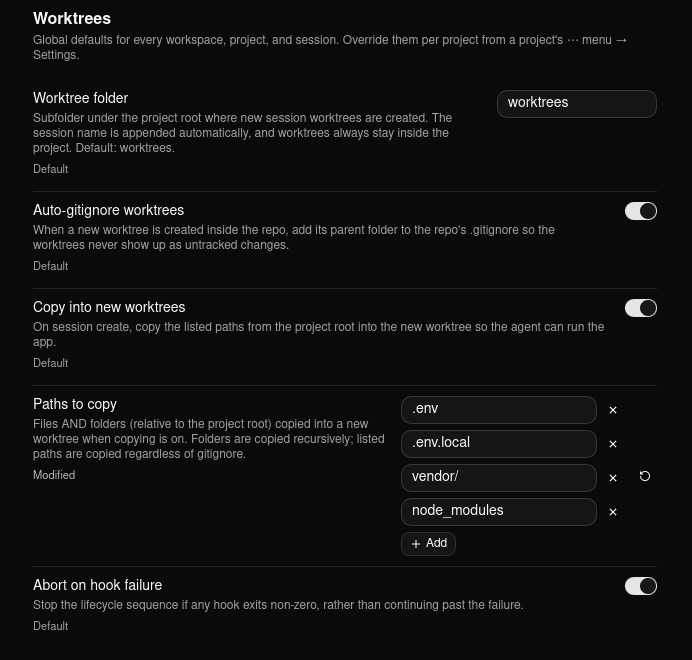
Paths are relative to the project root and copied as-is whether or not git tracks them; folders are copied recursively. Common additions are .env.development, a local config/ folder, or service-account credentials that live outside version control. Like any setting, these layer per scope — set a baseline globally and override it for one project.
Path safety
Plexus validates every copy path so a worktree can't be corrupted or used to escape the repo:
- Absolute paths and
..traversal are rejected. .and empty entries are rejected.- Symlinks are skipped — a top-level symlink copies nothing, and symlinks inside a copied folder are skipped — so the copy can't leak files from outside the repo.
- Missing sources are silently skipped, so a path that doesn't exist in a given project won't fail the launch. A path that disappears mid-copy — e.g. a tool rewriting
.envat that instant — is skipped the same way rather than failing the launch. A genuine error (an unreadable file, a full disk) still stops the launch, but the message names the exact path so you know what to fix.
Dev server ports
Two sessions of the same repository both want to run the dev server, and a hardcoded :3000 somewhere in the project means the second one fails to bind. So Plexus gives every session its own block of 10 localhost ports and puts them in the environment of everything it starts for that session.
The block is reserved when the session starts. Plexus checks the whole block is actually free before it commits to it, and the session keeps it for as long as its working copy exists — resuming a session hands back the same ports it had, so a dev server left running isn't moved out from under itself. Tearing the worktree down releases the block for the next session.
A session holding a block says so in two places. Open the session and its tab strip carries an Open localhost:20030 button, beside Hook output — one click opens your browser at that port, and the caret next to it holds Copy port and Reassign ports. On the dashboard, which has no session tab strip and is where you compare one session's ports against another's, each row shows its first port as a small chip instead; hover it and the tooltip names the whole range, Ports 20030–20039. A session with no block shows neither.
The variables
| Variable | Value |
|---|---|
PLEXUS_PORT | The session's first port — the one to use |
PLEXUS_PORT_BASE | The same number, spelled out for scripts that do arithmetic on it |
PLEXUS_PORT_COUNT | How many ports the block holds (10) |
PLEXUS_PORT_1 … PLEXUS_PORT_9 | The rest of the block — a second server, a test database, a debugger port |
PORT | The first port again, under the name most runtimes already read |
That last one comes from Extra port variables (Settings → Worktrees & hooks), which starts out as PORT and takes any names you want — VITE_PORT, API_PORT, RAILS_PORT. Each one is set to the session's first port. Names beginning with PLEXUS_ are refused, as are the ones the toolchain depends on (PATH, HOME, SHELL, TERM, and the Anthropic credentials).
The variables reach the session's agent, the session's terminal tab, and every lifecycle hook. The project view's own Terminal tab gets no port variables: it runs in the project's main checkout, which belongs to no session, so handing it one session's block would aim it at ports another worktree is already using.
Starting a server on them
The intended home is a run hook, which fires every time the agent starts or resumes:
pnpm dev --port $PLEXUS_PORT
On Windows a hook runs through cmd.exe, so write %PLEXUS_PORT% there.
Commit that to the repository's .plexus/hooks.json and everyone on the team gets it from a clone — see Repo-committed hooks:
{
  "run": [
    { "name": "Dev server", "command": "pnpm dev --port $PLEXUS_PORT" }
  ]
}
The range
Blocks are handed out of 20000–32000 by default — around 1200 of them, far more than you will ever have sessions. That window is deliberate: it sits above every common dev-server port (3000, 4200, 5000, 5173, 8000, 8080), above 10080 (the highest port Chrome and Firefox refuse to open, which would give you a server that starts fine and a browser that won't load it), and below 32768, where Linux starts handing the same numbers to outgoing connections.
Move it with First port and Last port if it clashes with something on your machine. Last port is an exclusive bound — a whole block of 10 has to fit below it, so the default of 32000 hands out ports up to 31999 — and a range too narrow to hold a single block is treated as a typo and ignored in favour of the defaults.
If every block in the range is taken or busy, the session still starts — it just gets no port variables, and a hook that reads $PLEXUS_PORT sees an empty value. Write hooks that tolerate that.
The port actions on a session
The button in the session's tab strip sits to the left of the Hook output tab and is split in two. Its main half opens http://localhost:<port> in your real browser; the caret beside it holds Copy port and Reassign ports, so nothing about the session's ports needs you to leave the session. Hover it and the tooltip names the whole block — Open http://localhost:20030 — ports 20030–20039.
The label shortens as space runs out: localhost:20030 in Compact, and just the icon on a narrow pane, so the tabs beside it stay reachable however far you drag the sidebar over. The button keeps its full name for screen readers and voice control at every width.
The same three actions are on every session's ⋯ menu — on its sidebar row and on its dashboard row alike — in a group of their own:
| Action | What it does |
|---|---|
| Open localhost:<port> | Opens http://localhost:<port> in your real browser, at the session's first port |
| Copy port | Copies that number to the clipboard |
| Reassign ports | Drops the session's block and searches for another |
Button and menu group alike are hidden, not greyed out, for a session that holds no block. There is nothing you could do from either to make ports appear — only starting or resuming a session reserves its first block — so a disabled control would promise something it can't deliver. The button needs one thing more: Assign dev server ports on for that project. Switch that setting off and it goes at once, no restart needed, because with the feature off nothing was ever told which port to listen on.
Open localhost — the button and the menu item alike — assumes your dev server is listening on the session's first port. That's the convention PLEXUS_PORT sets up, but Plexus doesn't check: if your run hook points the server at $PLEXUS_PORT_1, or the server isn't running, you'll get your browser's own error page.
Reassigning
A reservation is remembered, not re-checked. That's deliberate — re-probing on resume could move a running server's ports out from under it — but it means that while a session is stopped, something else on your machine can take one of its ports, and the session comes back to a block it can no longer bind.
Reassign ports drops the current reservation and searches again. A session that has never started gets its first block from starting, not from here. If nothing has taken the old block after all, the search finds it free and hands it straight back — you asked for a block that works, not for a different number. If the search comes up empty, the session is left holding no block at all: a toast says so, the port button goes, and the session gets ports again the next time it starts or resumes.
Reassigning does not move a dev server that is already running. The variables are handed to the things Plexus starts, at the moment it starts them, so a server a run hook launched keeps listening exactly where it was told to while the button and the menu already name the new block. Reassign while the session is stopped, or restart it afterwards, and the new numbers take effect.
Writing the ports to a file
Environment variables only reach what Plexus itself starts. Write ports to file (Settings → Worktrees & hooks, empty by default) additionally maintains the same variables in a file inside the session's working copy — typically .env or .env.local — for the things that don't inherit an environment from Plexus: docker compose reading .env for ${VAR} substitution, or a server you launch from your own terminal or IDE.
Plexus owns only the block between its two marker comments and leaves the rest of the file byte-for-byte alone:
# >>> plexus ports >>>
PLEXUS_PORT=20030
PLEXUS_PORT_BASE=20030
PLEXUS_PORT_COUNT=10
PLEXUS_PORT_1=20031
PLEXUS_PORT_2=20032
PLEXUS_PORT_3=20033
PLEXUS_PORT_4=20034
PLEXUS_PORT_5=20035
PLEXUS_PORT_6=20036
PLEXUS_PORT_7=20037
PLEXUS_PORT_8=20038
PLEXUS_PORT_9=20039
PORT=20030
# <<< plexus ports <<<
The block is written when the session's working copy is created and refreshed every time the session is resumed, so it always carries the ports the session is actually holding. The file is registered in the repository's local git excludes, so one machine's port numbers never end up in a commit an agent makes. Point the setting at a different file and the old one's block is cleaned up. Nothing is written for a root-tree session — the "worktree" there is your own checkout.
Related
- Hooks — run your own scripts at create, run, and teardown; the copy-paths step is a built-in that runs during create, and a run hook is where a dev server belongs.
- Secrets — keep API keys in your OS keystore instead of committing or copying them through
.envfiles. - Settings — every worktree setting and its default.