Lifecycle hooks
Run your own shell scripts when a session's git worktree is created, when the agent starts, and at teardown — set globally, per project or in the repo.
Lifecycle hooks are your own shell scripts that Plexus runs when a session's worktree is created, when its agent starts or resumes, and when it is torn down — so every new worktree starts ready to work.
The three events
A hook is attached to one lifecycle event. Each hook has a name and a multi-line command, run through sh -c on macOS and Linux or cmd.exe /C on Windows — write it as a small script, not just a single line.
| Event | When it fires | Typical use |
|---|---|---|
| Create | A new session worktree is created — on a new branch or an existing one alike | Install dependencies, scaffold local config, warm caches |
| Run | The agent starts or resumes | Start a dev server, tail a log, kick off a watcher |
| Teardown | A session is torn down | Stop background processes, clean up scratch resources |
Where hooks are defined
Hooks live at three levels, and lower levels inherit from higher ones:
- Global — apply to every workspace, project, and session.
- Workspace — apply to every project in that workspace.
- Project — apply to every session in that project. This level has two sources: the hooks you set up in Plexus, and the ones the repository commits to
.plexus/hooks.json. Both run — see Repo-committed hooks.
Sessions never define their own hooks; they always inherit the composed plan from their project. To change what a session runs, edit its project-level hooks. Open Settings → Worktrees & hooks (from a workspace's or project's Settings…, with Applies to set to the level you want), then select the Create, Run or Teardown row to edit that event's hooks in the side panel.
Composition modes
A non-global level doesn't just add its hooks to the inherited ones — it declares a combine mode that says how its hooks join what it inherits.
| Mode | Effect |
|---|---|
| Override | Discard all inherited hooks; only this level's hooks run (the managed built-ins still run — see below). |
| Before | Run this level's hooks ahead of the inherited ones. |
| After (default) | Run this level's hooks behind the inherited ones. |
| Parallel | Run this level's hooks concurrently, alongside the rest. |
Set the mode from the Combine mode choice in each event's side panel (the Create, Run or Teardown row) at the workspace or project scope.
Resolution and execution order
Plexus resolves the plan top-down — global → workspace → project — applying each level's combine mode. At the project level, the repository's committed hooks and your app-managed project hooks are first joined into one ordered list (the repository's first, by default); that combined list is what the project's combine mode then applies. The resulting plan then runs in four phases, always in this order:
- Before — sequential. A non-zero exit can abort the launch (see below).
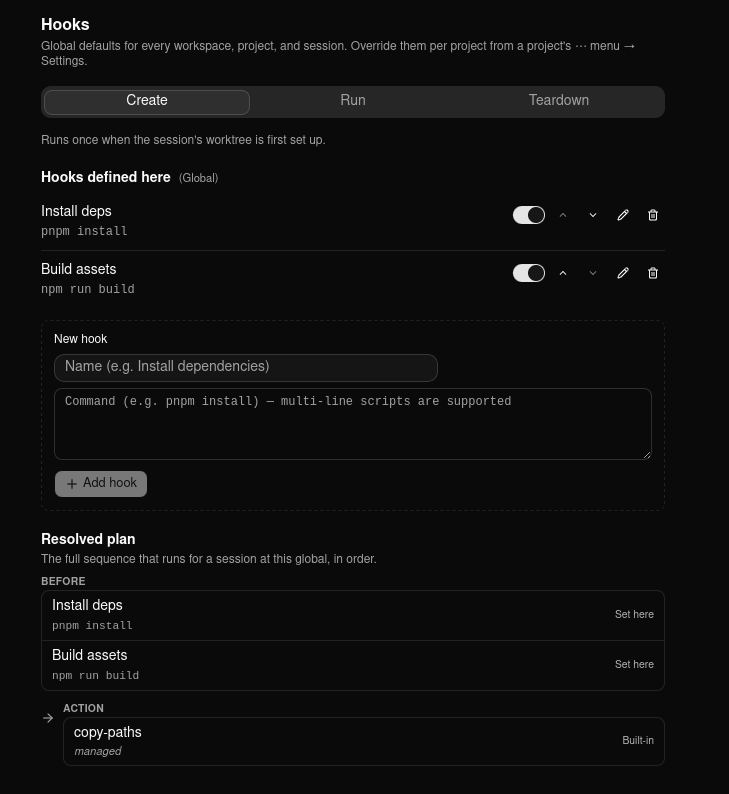
- Action — the event's managed built-ins (for Create, the copy-paths step, and the port-file step when you've asked for one).
- Parallel — concurrent, best-effort. A failure here never aborts.
- After — sequential, and always runs.
Within the Your hooks list, use the up/down controls to set the order of your own hooks at that level. The live Resolved plan preview shows the final four-phase plan exactly as it will run — every hook, its source badge (Global / Workspace / Project / Built-in / From repo), and whether it's enabled. This is the fastest way to confirm inheritance did what you expect. Toggle any hook off without deleting it; disabled hooks stay in the list and appear dimmed in the preview.
The managed built-ins
On the Create event, Plexus runs up to two managed steps of its own. They live in the Action phase and are immune to Override: even a project that overrides every inherited hook still gets them.
- copy-paths copies configured files into the new worktree — this is how gitignored files like
.envreach the session. Configure it with Copy files into new session folders and Files and folders to copy (default.env,.env.local) — see Worktrees for the full path rules. - port-env-file writes the session's dev server ports into a file in the worktree. It only appears in the plan once Write ports to file names one; the setting is empty by default, so most plans never show this step. Unlike copy-paths it also runs again whenever the session is resumed, so the file always carries the ports the session is actually holding.
What a hook gets in its environment
Hooks inherit the environment Plexus itself was launched with — your PATH, your toolchain, your shell's variables — minus the Anthropic credentials, which are always stripped. On top of that, a hook running for a session with a reserved port block gets:
| Variable | Value |
|---|---|
PLEXUS_PORT | The session's first dev server port |
PLEXUS_PORT_BASE | The same number, for scripts that do arithmetic on it |
PLEXUS_PORT_COUNT | How many ports the block holds (10) |
PLEXUS_PORT_1 … PLEXUS_PORT_9 | The rest of the block |
PORT | The first port again — this one is configurable, via Extra port variables |
The same set reaches the agent and the session's terminal tab, so a server a hook starts and a command the agent runs by hand agree about which port to use.
pnpm dev --port $PLEXUS_PORT
Repo-committed hooks
A team can share hooks by committing them to the repo at .plexus/hooks.json. The file maps each event to an ordered array of { name, command } entries; command may be multi-line and may call a repo script.
{
  "create": [
    { "name": "Install deps", "command": "pnpm install" },
    { "name": "Setup", "command": "set -e\nbash .plexus/hooks/setup.sh" }
  ],
  "run": [],
  "teardown": []
}
When this manifest is present and Run scripts committed to the repository (default on) is on, its hooks run alongside the project hooks you set up in Plexus. Cloning the repo is enough for a teammate to get the team's setup, and it no longer costs them the hooks they added for themselves. How repository hooks combine with yours (Settings → Worktrees & hooks) decides which set goes first:
| Value | Effect |
|---|---|
| Repository hooks first, then your app-managed hooks (default) | The committed hooks run, then yours. |
| Your app-managed hooks first, then the repository's | Your hooks run first, then the committed ones. |
| Repository hooks only (skip this project's app-managed hooks) | The committed hooks replace this project's app-managed hooks. |
Both sets belong to the project level, so they share that level's combine mode and run in the same phase. Your global and workspace hooks still run — unless this project's Combine mode is Override, which discards inherited hooks whichever value you pick. The order has no effect under Parallel either, where the project level's hooks run concurrently.
Like the other hook settings, it layers Global → Workspace → Project: one global choice covers every project, and a single project can still differ.
The Run scripts committed to the repository row on the Project scope controls them; turn it off to run only your own hooks, without deleting the file. If the manifest fails to parse, the error is surfaced in the editor and only your app-managed project hooks run, rather than breaking the session.
Aborting on failure
Stop if a setup step fails (Settings → Worktrees & hooks, default on) stops a session launch if a Create hook in the before or action phase exits non-zero — so you never get a half-set-up worktree. Run and teardown hooks never abort the lifecycle. Override the setting to make Create hooks non-blocking. Repository hooks and the ones you set up in Plexus are treated identically here — a non-zero exit from either aborts a Create the same way.
Hook timeout
Hook timeout (Settings → Worktrees & hooks, default 600 seconds, set globally or per project) caps how long any single hook command may run. On expiry the command and everything it started are stopped, and the hook is recorded as timed out in the Hook output tab.
A timeout is deliberately not treated as the hook failing: it never stops a launch, even with Stop if a setup step fails on. Stopping there would delete the session's working copy — and, when Plexus cut it, its branch — over something transient, and a cold pnpm install or a first checkout of a large repository really can outrun ten minutes. So the session starts, whatever the hook managed to do is left in place, and the tab tells you which step was cut short. Rerun it yourself, or raise the timeout and start again. A hook that exits with an error still stops the launch as before — that's the hook saying no, rather than Plexus giving up waiting. Either way, a session started on an existing branch loses only its half-built worktree: the branch itself is never removed by an abort.
Raise the timeout if you have a legitimately long setup step. There is no "unlimited" option on purpose: a hook that leaves a background process running would otherwise hold the session's launch open indefinitely. If a hook is simply taking too long right now, Cancel on the starting session stops it.
Viewing hook output
Open a session's Hook output tab — on the right of the session tab row, set apart from Agent, Review, Explorer, and Git, with the session's Open localhost button beside it when it holds a block of dev server ports — to see what its hooks actually did. Each Create and Run hook is listed with its captured stdout, stderr, and exit status; a hook that exited non-zero (or that aborted the launch) is flagged in red, and a hook that printed nothing shows (no output). This is where a hook that prints something meaningful surfaces it, and the first place to look when a launch fails.
Plexus keeps the latest run of each event: Run hooks re-run on every start and resume, so the tab always reflects the most recent launch; Create hooks run once when the worktree is made, and their output is kept even if the create hook fails and the launch rolls back — so you can reopen a failed session and see exactly why. The output persists across app restarts.
Related
- Worktrees — the copy-paths built-in, the environment-file rules, and the dev server ports a hook can read.
- Secrets — how Plexus stores credentials in the OS keystore.
- Settings — every hooks and worktree setting and its default.
- Prompt templates — the other thing a repository can commit for everyone who clones it, and the one that runs nothing.